Marketing can generate the lead and capture valuable engagement data, but that information only creates value when Sales can act on it. By enriching the data that flows into Salesforce, teams can give Sales the context they need to prioritize leads and build routing processes that are more informed, consistent, and scalable.
In Salesforce, organizations can use the Campaign Members object to trigger smarter lead routing. Because Campaign Membership is related to Leads or Contacts, automation can use data from those records to inform routing decisions.
The opportunity is bigger than simply getting leads to the right queue. By leveraging the Campaign Members functionality we can give sales teams immediate context about who a prospect is, how they engaged, and what they may be interested in.
As a Salesforce Admin, here are three practical steps to enrich your Campaign Member data, improve routing decisions, and surface actionable insights for Sales.
Step 1) Give your campaign the custom detail it needs for Sales to understand what the campaign is all about by adding a Text field to the Campaign object.
Having a text field on a campaign enables you to add another layer of detail to that campaign that may not be available via a picklist.
- Add a Text field to your campaign object, we can call ours “Campaign Insight Summary”
- Instruct marketers to add specific products, campaign details, or a link to a PDF to that Text field.
- PRO TIP: Update routing logic to look at Campaign Insight Summary to help determine which routing team a lead should go to
Step 2) Give Sales more context by adding custom lead interaction details to your leads. Add a Text field to the Lead and Contact objects.
- Add a Text field to your Lead and Contact objects, let’s call ours “Additional Information”
- Use your MAP to append notes onto this field. Information can be custom topics selected on a reg form, or actual notes that were collected at an event.
Step 3) Preserve attribution context by capturing last-touch UTM data. Add last touch UTM fields to the Lead and Contact objects.
- Create the Text fields (the targets) on the Lead and Contact objects. Examples: “Last Touch UTM Source”, “Last Touch UTM Medium”.
- Configure your Marketing Automation Platform Sync. Your web forms should grab the UTMs from the browser URL and store them in your MAP.
Remember to map these new fields for Lead to Contact conversion!
Here’s where this all comes together. Formula Fields act like windows into critical actionable data on other objects. Since the Campaign Member has native lookup relationships to Leads, Contacts and Campaigns, you surface information from those objects automatically using Cross-Object Formulas.
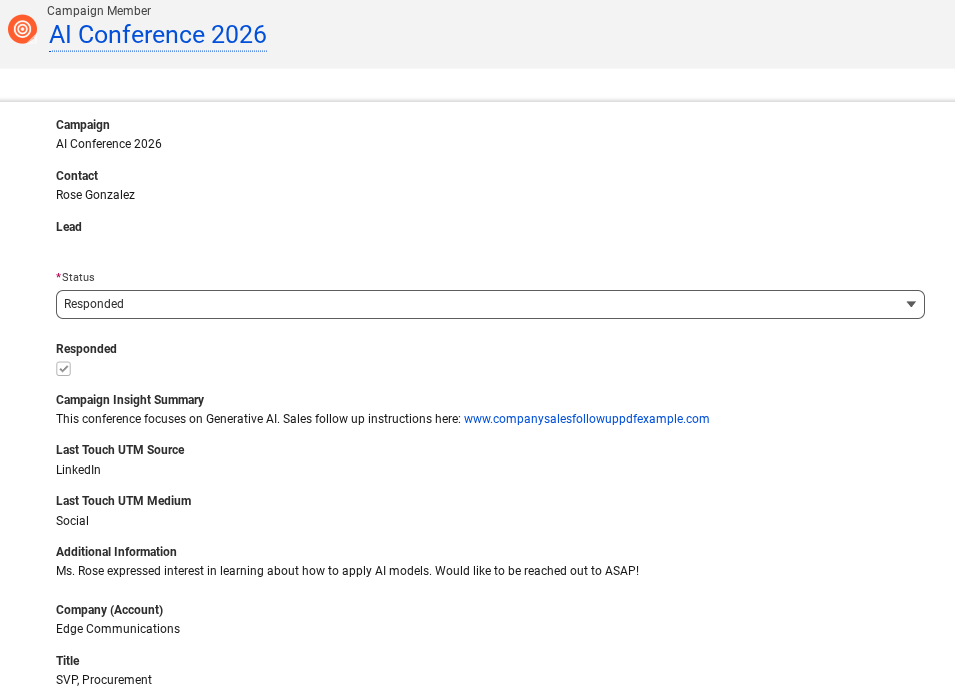
First, create a Formula Field on the Campaign Member
- Go to Setup > Object Manager > Campaign Member > Fields & Relationships.
- Click New. Select Formula and click Next.
- Label your field, let’s start with Campaign Insight Summary. Select Text as the Formula Return Type, then click Next.
Next, write Cross-Object Logic referencing the Campaign Object
- Use the “Advanced Formula” Builder tab, click Insert Field.
- Find the Campaign Object, then click on the new Campaign Insight Summary field, click Insert.
- Click Check Syntax. Save profile visibility and layout settings. Click Save.
Finally, write the Cross-Object Logic referencing the Lead and Contact Objects
- Repeat the steps 1-3 above for the UTM and Additional Information fields
- For Leads and Contacts, you will need to manually paste the following formula for each field into the Simple Formula builder tab:
IF(ISBLANK(ContactId),
  Lead.Your_Field_Name__c,
  Contact.Your_Field_Name__c
)- Click Check Syntax. Save profile visibility and layout settings. Click Save.
- Repeat for the rest of the new fields.
Bottom line: Great lead routing isn’t just about sending them to the right queue. It’s about giving Sales the context they need to have productive conversations, improving attribution, and creating a better experience and driving more informed decisions across the revenue lifecycle. With a few thoughtful Salesforce enhancements, your Campaign Member records can become a powerful source of actionable insights.
Ready to enrich campaign members with actionable context? Connect with the Marvel Marketers team to discover how we can help you build scalable Salesforce solutions that align Marketing, Sales, and Revenue Operations.